


QToon: Manga, Manhua & Comics
0.00.00 Reviews
App Specs
- Version
- 1.0.13
- Updated On
- License
- Free
- Downloads
- 50,000+
- Developer
- K-drama world
- Categories
- Comics
- Platform
- Android
Screenshots
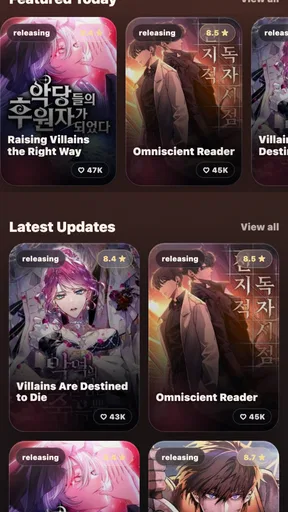
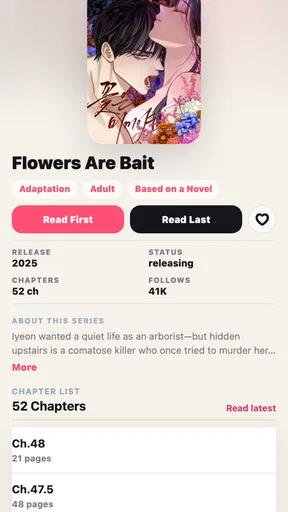

 Analysis by AppCompare
I’d approach QToon: Manga, Manhua & Comics as a reader first and a trust-conscious phone user second. It is a free comics app from K-drama world, and its appeal is straightforward: bring several illustrated-story formats into one place, then make it easier to return to what you were reading. That is a useful idea if your reading habits are scattered across manga, manhwa, manhua, and comics, but it also makes the app’s day-to-day clarity important. A reader should be able to tell what they are opening, where they left off, and what choices they have while using it.
Reading across formats without losing your place
The best reason to try QToon is its broad reading focus. Rather than presenting itself as a single-format manga tool, it is intended for people who move between different kinds of comics. That can suit a reader who follows a Japanese series one day and wants to browse Korean or Chinese comics the next, without mentally treating each as a separate hobby. The official reader framing also makes saved progress central to the experience: remembering where a chapter ended is a small convenience that matters a lot when a story has long runs or irregular reading sessions.
In ordinary use, I would treat saved progress as a practical bookmark rather than a reason to stop keeping track of favorite series elsewhere. For example, if I read a few pages while waiting for a bus and then switch to another title at home, a reliable resume point saves me from scanning panels to find my place. It is especially helpful when I read several stories in parallel. The trade-off is that a progress marker is only useful when it is clear which title and chapter it belongs to, so I would still make a habit of checking the chapter title before continuing a series after a long break.
QToon is listed in the Comics category and is aimed at a Teen audience. That makes it a reasonable candidate for older young readers and adults who want a general comics reader, though an age label is not a substitute for checking an individual series’ subject matter. If you are choosing stories for a younger reader, I would review each title together rather than assume that every comic in a broad-reading app will suit the same age.
Who is likely to enjoy it
I think the clearest fit is someone who already reads comics on a phone and values having multiple formats within one reading routine. It may also appeal to a casual reader who wants a low-commitment way to try a comics app without paying upfront: QToon is free, and it has passed the 50K-install mark. Those details indicate an established audience and no initial purchase barrier, but they do not tell me how broad the catalogue is or whether every reader will find their preferred titles. I would install it with a specific expectation—convenient reading and progress keeping—not with an assumption that it contains every series I follow.
It is less compelling for readers who want a highly specialized manga library, deep collection-management tools, or a service whose appeal depends on a particular publisher’s catalogue. A dedicated platform can be the better choice when you already know which series or official source you want. Likewise, if you rarely read comics on a phone, QToon’s format range will not by itself make a small screen comfortable. The useful question is not simply whether it supports several comic traditions, but whether its reading flow matches the way you actually read.
Trust starts with what can be judged
When I assess a reading app, I separate what I can observe from what I would need to inspect in its current store and device settings. QToon’s core role is clear: it is a reader for illustrated stories with saved progress. That gives me a useful basis for judging whether the app belongs in my routine, but it does not answer every privacy or account question. I would not treat a broad description of its purpose as evidence about permissions, data handling, or account controls.
Worth Reading Before You Choose

Baby Panda World Brings Quick Play to Modern Phones, but Its Game Library Feels Busy

ESPN’s Live Game View Makes Following Close Games Easier

QuizzLand Review: A Good Fit for Short Trivia Breaks, Not Every Player

Basketball Stars: Multiplayer Is Fast, but Can It Recover When Matches Go Wrong?

WEBTOON Turns Phone Updates Into a Better Reading Routine

Link to Windows Runs on Shared Habits, Not Social Feeds
That distinction matters because comics reading can become personal. A reading history may reveal genres, themes, or routines a user would rather keep private. Before signing in, granting a permission, or entering personal details, I would read the relevant on-screen explanation and decide whether it is necessary for the action I want to take. If the app presents a choice, I would choose only what supports my intended use. If it does not explain a request clearly, pausing is more sensible than tapping through automatically.
The developer is K-drama world, and QToon’s current version is 1.0.13. I would use that version detail as a simple check when troubleshooting: if an issue appears, first confirm that the installed app is current, then see whether the same behavior happens after reopening it. That is a practical step, not a guarantee that a particular problem has been fixed. The app requires Android 7.0 or later, which gives Android users a basic compatibility threshold to check before installing.
What I would check before making it a habit
For a trust-conscious first session, I would take a few minutes to notice what the app asks for and what it lets me decide. Is an account presented as necessary for the reading task I want to do, or is there a choice to proceed without one? If a permission prompt appears, does its explanation fit the feature I am trying to use? Are there visible settings for account details or reading preferences? These are questions to answer from the actual screens, not assumptions to make from the app’s name or category.
I would also keep my first test deliberately low-stakes. Open a title I am comfortable reading, leave it partway through, and return later to see whether saved progress behaves as expected. This checks the feature that matters most to QToon’s stated purpose without requiring me to build a large library or share more information than I intend. If I decide the reader suits me, I can gradually add more titles and learn how it handles my routine. If it does not, I have not invested much time in organizing my reading around it.
There is a useful distinction between a saved place in a story and a complete personal archive. Progress tracking helps with continuity, but I would not rely on it as the only record of a long-term reading list. Keeping a short note of titles I care about—or remembering where I found a series—can make switching apps less frustrating. That small bit of independence is worthwhile whenever an app is new to me or when I am not sure how much control it gives over my reading history.
Everyday workflow and small trade-offs
A realistic use case is a reader who has ten minutes between errands, reads one chapter on a phone, and wants to resume another series later that evening. QToon’s multi-format scope and progress-saving purpose line up well with that pattern. I would avoid starting a long session by opening several unfamiliar titles at once; instead, I would test one or two stories and see whether the app makes it easy to recognize the series and return to the right point. That reveals more about the experience than browsing endlessly without actually reading.
Another worthwhile habit is to check the chapter context before resuming after a gap. A saved position can put you near the right panel, but readers sometimes forget whether they paused at the end of one chapter or the beginning of the next. Confirming the title and chapter prevents accidental spoilers or rereading. It is a modest workflow tip, but it makes progress saving more dependable in practice, particularly for anyone following several ongoing stories.
Compared with the usual alternatives, QToon’s broad format remit is its distinguishing promise, while a single-publisher or single-format reader may offer a more focused destination for a reader with a fixed collection. I would choose QToon when variety and convenient resuming matter more than allegiance to one source. I would choose a specialist alternative when catalogue certainty, publisher-specific access, or a particular set of reading tools is the priority. Neither approach is automatically better; it depends on whether you browse widely or arrive knowing exactly what you want to read.
Making an informed choice
The app’s Teen content rating is a useful starting point for families, not a guarantee that every story will match every household’s preferences. I would check the content of an individual comic before recommending it to a younger person, especially if the reader is sensitive to particular themes. That is a better approach than judging a series only by its visual style or by the app’s general age label.
QToon was released on Aug 29, 2026, and its free entry point makes trying it relatively simple for readers who meet the Android requirement. I would still consider the ongoing cost of attention: does the reader make it easy to return to stories, and do the visible choices feel understandable? A free app can be worthwhile when it serves a clear routine, but price alone is not a reason to make it the home for every title or to grant permissions without thought.
A practical trial for different reading habits
If you are deciding whether to keep it, I would test QToon against the way you actually discover comics, not just the way you finish them. A reader who browses across formats may value having one place to sample different traditions; someone who arrives with a particular licensed series in mind should first check whether that title is available. That distinction can save time: broad format coverage is not the same thing as guaranteed access to a specific comic.
For a commute, I would pick a familiar title, read a manageable stretch, and return to it later after switching to another story. This reveals whether the saved place is useful across the kind of interruptions that happen in daily life. For a shared family device, I would be more cautious: check what account or reading-history choices are visible before treating one profile as suitable for multiple people, and review each comic rather than relying on the general age label.
One small trade-off with any all-in-one reader is that convenience can make it tempting to move your whole reading routine immediately. I would resist that until I know whether the app’s available titles and visible controls suit me. Keep a note of a series’ name and where you found it while testing; then, if you later prefer a specialist service, you are not relying on memory to rebuild your reading list. This is especially useful for readers who follow ongoing stories across more than one app.
Readers who mainly want a large, carefully organized personal collection may be happier with a platform built around library management. Those who prefer browsing several comic formats and resuming casually have a clearer reason to try QToon. I would also skip it if phone reading is uncomfortable for you or if your choice depends on a specific title that you cannot find. The app’s appeal is practical rather than universal: it makes most sense when its range and stop-and-start reading style match your habits.
Ultimately, I see QToon as a promising fit for readers who want one place to move among manga, manhua, manhwa, and comics and value having their place saved. Its strongest practical case is an everyday, stop-and-start reading habit, not a claim that it replaces every specialist service. I would try it with a small selection, observe the actual account and permission choices, and keep another way to remember important titles. If that modest test feels comfortable and the reading flow suits you, it is worth keeping; if you need a more focused catalogue or clearer controls than you can see in the app, a dedicated alternative is the safer match.
Pros
- Combines manga
- manhua
- and comics in one reading app.
- Offers a convenient way to browse titles across different genres.
- Reading progress makes it easier to pick up where you left off.
- A mobile-friendly format suits reading on the go.
- A broad catalog can help readers discover unfamiliar series.
Cons
- Catalog availability may vary by region or change over time.
- Some chapters or features may require payment or an account.
- Reading requires a stable internet connection for online content.
- Frequent updates may be needed to access the latest features.
- Small text or panels can be difficult to read on compact screens.
FAQs for QToon: Manga, Manhua & Comics
What is QToon: Manga, Manhua & Comics?
QToon is a mobile reading app for digital comics, including manga, manhua, and other comic stories. Its catalog and available features may vary by region and app version, so browse the listings to see whether your preferred genres and titles are included. Before downloading, check the app-store description and recent reviews for current details about its library and supported languages.
Is QToon free to use?
The app may be free to download, but that does not necessarily mean every chapter or feature is available at no cost. Some reading services use ads, in-app purchases, subscriptions, or virtual currency to unlock content. Review QToon’s current store listing and its in-app purchase details before spending money, and check chapter pricing and renewal terms carefully if a paid plan is offered.
Can I read comics offline with QToon?
Offline reading depends on whether QToon provides a download feature and whether a particular title or chapter is eligible for it. Look for download controls in the app and check any restrictions, such as requiring an account, a paid plan, or an internet connection to verify access. If you plan to read while traveling, test the feature before relying on it without a connection.
Does QToon offer comics in English?
Language availability can differ from one title to another, and the app’s catalog may change over time. Check the language labels, chapter previews, or filters in QToon before choosing a series, especially if you are looking for English translations. Also note that an app interface in English does not guarantee that every comic is available in English.
Is QToon safe to download, and what should I check first?
Download QToon from the official Google Play Store or Apple App Store rather than an unfamiliar website, and confirm the developer name before installing. Review the permissions it requests, its privacy information, age rating, and recent user feedback. As with any reading app, avoid sharing unnecessary personal details and check account, payment, and parental-control settings if children will use it.


